Backhaul Direct, LLC
ShipDeez — End-to-End Shipping Platform
Timeline
10 business days
Value Delivered
85% savings
vs retail shipping rates
The Problem
Small shippers consistently overpay for shipping. Without the volume that enterprise accounts have, a small business or casual shipper pays full retail rates — often 50–85% more than necessary — because they can't access negotiated carrier programs.
Backhaul Direct had the carrier relationships to change that. The plan: aggregate buying power across thousands of small shippers and pass the savings through a clean, consumer-friendly platform. That platform became ShipDeez.
The hard part wasn't the idea. It was the timeline: launch in 10 business days. The underlying platform contracts activated March 1, 2026 whether or not the product was designed.
The Constraints
Hard Deadline
10 business days. Contractual, not aspirational. The platform activates March 1 with or without a complete UX.
Three-Platform Stack
ShipDeez runs on EasyPost, ShipBlink, and Forge. Every design decision had to work within what these platforms could actually do in v1.
No Custom Backend
Designs had to operate within existing API capabilities. Server-side development was out of scope.
Two User Types
A casual shipper who needs one label right now, and a regular shipper who needs a dashboard and saved addresses. These users have almost nothing in common.
Brand From Scratch
No existing identity. Color, typography, tone, component library — all built alongside the product.
Wallet-Based Billing
EasyPost uses pre-funded wallets. Most shipping tools don't have to design for insufficient funds, failed charges, or mid-payment abandonment. We did.
ShipDeez — End-to-End Shipping Platform
Role: Lead Product Designer (UX, UI, Brand, Analytics, Webflow) Company: Backhaul Direct, LLC Timeline: 2-week sprint (10 business days) Tools: Figma, Webflow, EasyPost API, ShipBlink, Claude, GPT
The Problem
Small shippers consistently overpay for shipping. Without the volume that enterprise accounts have, a small business or casual shipper pays full retail rates — often 50–85% more than necessary — because they can't access negotiated carrier programs.
Backhaul Direct had the carrier relationships to change that. The plan: aggregate buying power across thousands of small shippers and pass the savings through a clean, consumer-friendly platform. That platform became ShipDeez.
The hard part wasn't the idea. It was the timeline: launch in 10 business days. The underlying platform contracts activated March 1, 2026 whether or not the product was designed.
What I Was Responsible For
I was the sole designer on this project. I owned everything from strategy to delivery:
- UX architecture and user flows for both paths
- Wireframes and high-fidelity UI across all core screens
- Brand identity from scratch
- Design system and component library
- Landing page design and Webflow build
- Platform implementation mapping (which screen lives where in the stack)
- Developer handoff documentation
- Analytics instrumentation plan
I worked directly with the CEO, project lead, and technical lead across daily check-ins and weekly demos.
Research
Platform walkthroughs. I spent serious time inside ShipBlink's white-label screens, EasyPost's API docs, and Forge's customization limits before designing anything. You can't design within constraints you don't fully understand.
Competitive analysis. I mapped Pirate Ship, Shippo, and EasyShip to understand what's table-stakes and where there's room to differentiate. The main takeaway: most shipping tools are either confusing, ugly, or both. There's more room than you'd think.
Two personas. Working from the client's customer knowledge, I mapped two primary users:
The Guest Shipper — Ships once or rarely. No interest in creating an account. Wants the fastest path from "I have a package" to "I have a label." Cares most about price and speed.
The Regular Shipper — Small business owner or e-commerce seller. Needs saved addresses, shipment history, tracking dashboards, and potentially store connections. Cares about reliability, cost savings over time, and not having to re-enter the same address every time.
The Biggest Design Call: Two Separate Entry Points
The most important decision I made on this project: don't funnel both user types through the same path.
If a casual shipper hits a sign-up form before they've seen any value, most of them are gone. They came to print a label, not set up an account. Forcing that creates friction at exactly the wrong moment.
So I designed two clearly separated paths from the landing page itself:
- "Just Print Me a Label" — Guest path. No account required. Enter addresses and package details, compare rates, pay, download. Under 2 minutes start to finish.
- "Create My Account" — Full onboarding into a dashboard with wallet funding, saved addresses, history, and store connections.
The success screen for guest users includes a conversion prompt: "Ship Often? Save Even More. Create a Free Account." That's where we convert casual shippers into regulars — after they've already experienced the savings, not before.
Platform Mapping
Before designing screens, I mapped every interaction to its execution layer — which platform actually owns it:
- ShipDeez-owned UI: Landing page, guest quick-label flow, account creation, payment
- ShipBlink (via Forge white-label): Authenticated dashboard, shipment management, store connections
- EasyPost API: Rate retrieval, address verification, label generation, tracking
This mapping answered "who builds what?" for every screen before we got into detailed design. Without it, the dev team would have built things in the wrong system and we'd have lost days undoing it.
The Guest Flow
Quick Label Form
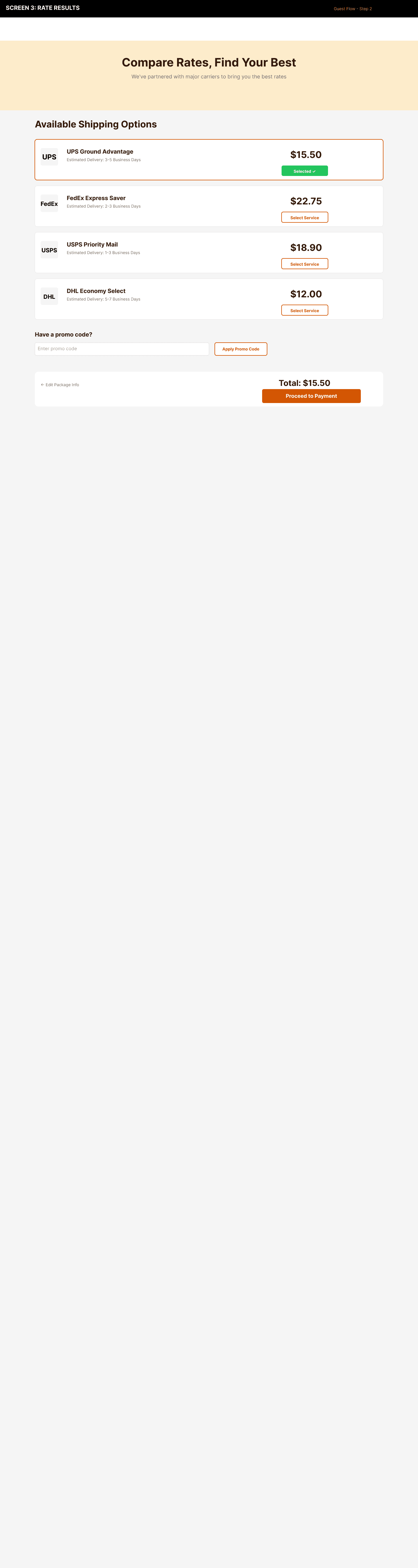
The most critical conversion screen. A casual shipper clicked "Just Print Me a Label" — now they need to enter package details without getting bogged down.
Key decisions:
- Single-page form, grouped clearly: From Address, To Address, Package Details
- Service Preference dropdown with a "Balanced" default to pre-filter results by speed vs. cost
- Optional fields are actually optional (company name, second address line)
- Full-width "Get Rates" CTA at the bottom so the next step is obvious
This screen was built to keep a first-time shipper moving forward with as little friction as possible. By limiting the form to the essentials and pre-setting a balanced service choice, the design avoids decision paralysis and makes the next step feel fast and reliable.
Rate Results
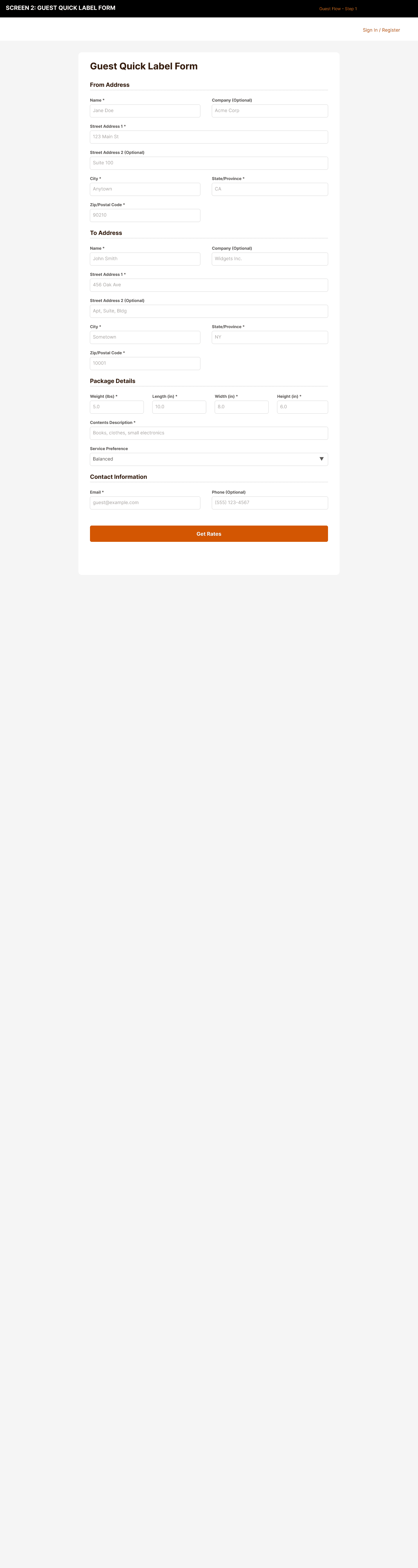
This is where ShipDeez's value proposition becomes tangible. Users see their actual discounted rates side by side.
- Card-based layout: carrier logo, service name, delivery estimate, price
- Lowest price pre-selected with a green "Selected" badge to reduce decision fatigue
- Promo code field for affiliate and marketing campaigns
- Persistent order summary so the running total is always visible
The rate results screen was designed to make savings obvious without requiring people to understand shipping jargon. By highlighting the best option and keeping the summary visible, the UI supports confident selection in a category that normally feels overwhelming.
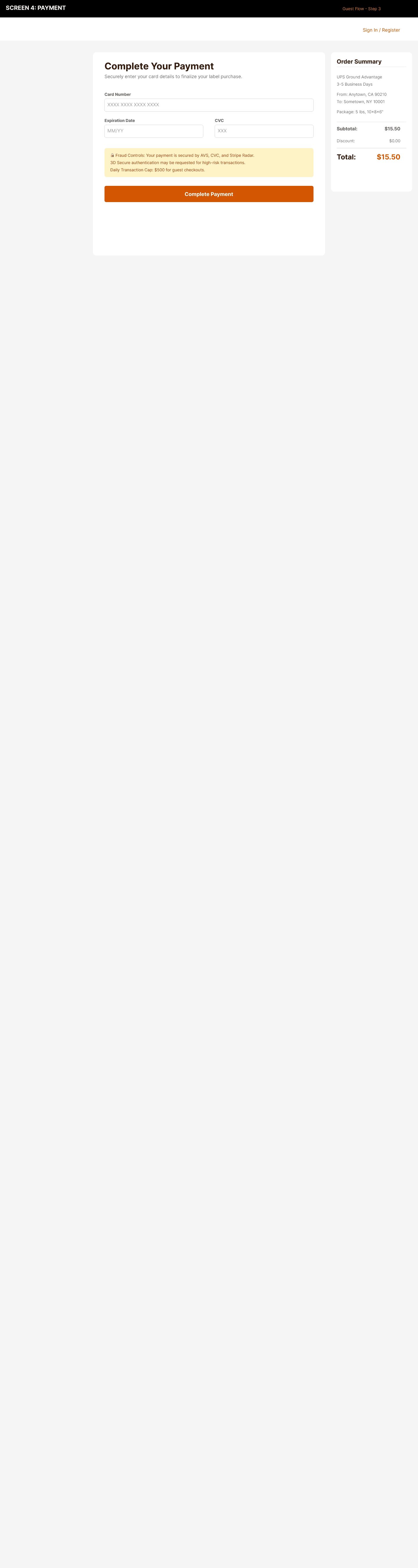
Payment
A first-time user entering card info on a brand they just discovered. Trust is the design problem here.
- Order summary sidebar showing exactly what they're paying for
- Explicit fraud protection callout: "Secured by AVS, CVC, and Stripe"
- 3D Secure note for high-risk transactions
- Guest checkouts capped at $500/day — sets expectations and limits fraud exposure
Success and Label Download
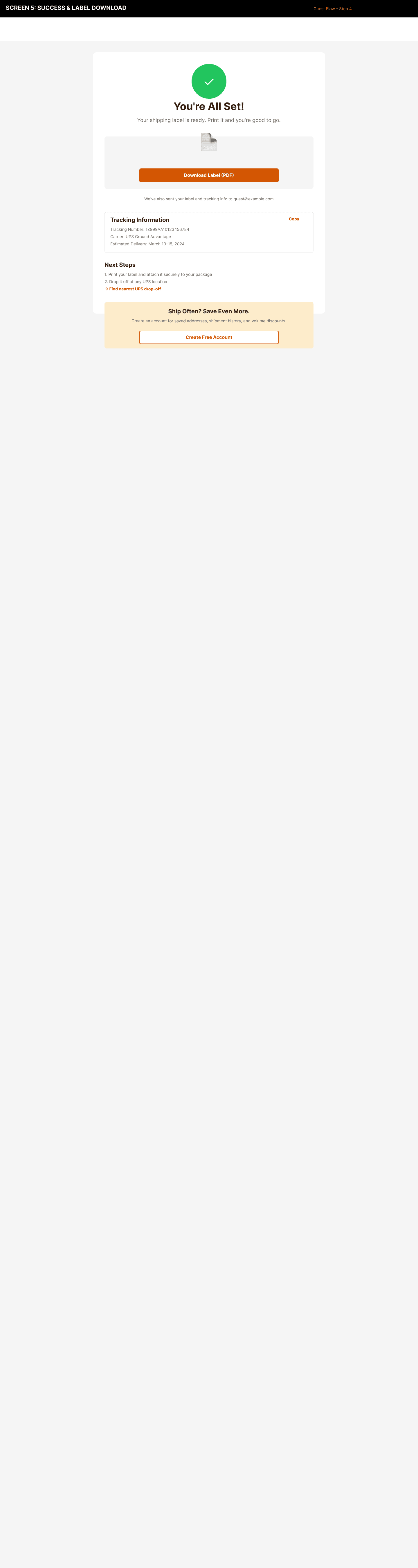
The payoff.
- Green checkmark, "You're All Set!" — warm and clear
- "Download Label (PDF)" is the dominant action
- Tracking info shown immediately: tracking number, carrier, estimated delivery
- The conversion moment at the bottom: "Ship Often? Save Even More." with a free account CTA
Success had to feel immediate and earned. This screen makes the experience concrete with a dominant download action and instant tracking details, then uses that positive outcome as the right moment to invite users into a repeatable relationship.
Design Decisions
The reasoning behind key choices across the guest flow
Screen 1 — Landing page
-
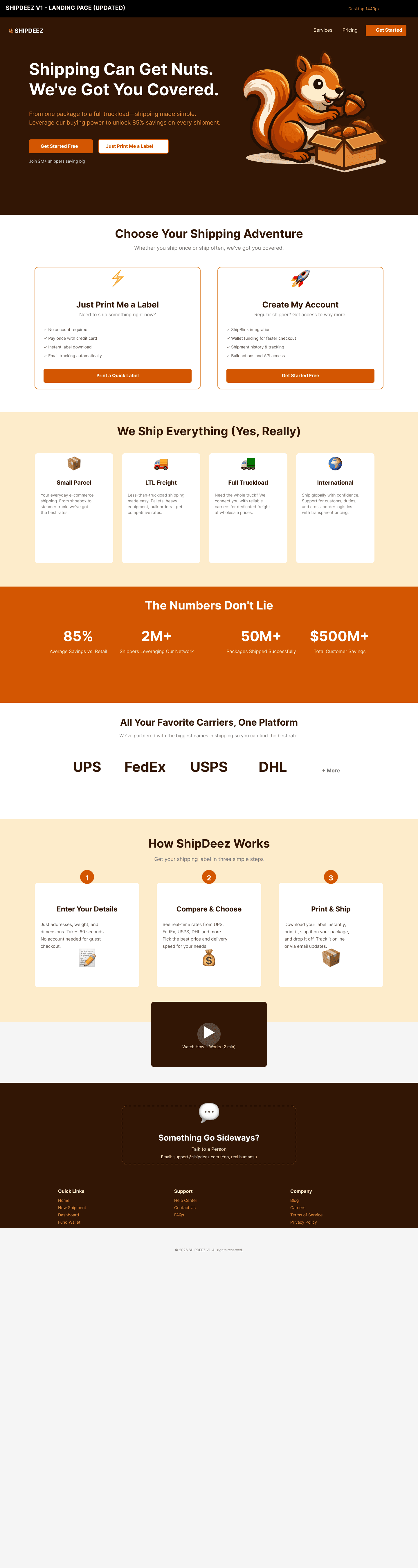
Two entry points, separated from the first interaction
The most important decision on the landing page was splitting guest and authenticated paths from the hero. Most shipping platforms funnel all users through account creation before showing any value. Guest shippers who hit a sign-up form before generating a label will leave. Separating the two paths removes that friction at the exact moment it would cause the most drop-off. -
Dark hero anchors the brand without competing with the UI
The ShipDeez brand dark (#2B1408) is used exclusively for the hero and navigation. Every subsequent screen runs on white. This creates a clear visual handoff from marketing to product so users know when they've entered the tool. -
Feature lists written for the user's decision, not the product's capabilities
"No account required" and "Pay once with credit card" speak directly to the guest shipper's concern about commitment. "Wallet funding" and "bulk actions" speak to the regular shipper's workflow needs. The same feature set, filtered through two different mental models.
Screen 2 — Rate results
-
Lowest price pre-selected, not fastest or most popular
The product's value proposition is savings. Pre-selecting the lowest rate makes that promise tangible the moment the screen loads. Users who want faster delivery can opt up — but the default anchors to the core reason they chose ShipDeez over their carrier's website. -
Selected state uses brand accent plus a semantic success color
The orange border and green "Selected" badge on the chosen card create a two-signal confirmation. A first-time user unfamiliar with the brand still reads the green as confirmation. A returning user builds association with the orange. -
Running total stays visible without a sidebar
On a single-column layout, a persistent sidebar would push content below the fold on most viewports. The total row at the bottom achieves the same function — users always know what they're about to pay — without requiring a two-column layout that breaks on mobile. -
Promo code placed after rate selection, not before
Placing the promo field at the top creates a pattern where users pause before seeing rates, hunting for a code they may not have. Positioning it after selection means the promo becomes a bonus, not a gating question.
Screen 3 — Payment
-
Order summary at the top, not the bottom
A first-time user on a brand they discovered 90 seconds ago is entering card details on trust alone. Showing exactly what they're paying for before the card fields reaffirms the decision they just made and removes any moment of uncertainty before they commit. -
Trust signals are specific, not generic
"Secured by AVS, CVC, and Stripe" names the actual mechanisms rather than a vague "secure checkout" badge. Users who know what AVS and 3D Secure mean are reassured by the specificity. Users who don't still read it as institutional credibility. -
$500/day cap disclosed at the point of entry
EasyPost requires a daily cap on guest checkouts for fraud risk management. Rather than surface this as an error after someone tries to pay more, the cap is disclosed as a note below the CTA. It sets expectations and doubles as a nudge — high-volume shippers see immediately that an account removes the restriction.
Screen 4 — Success
-
Download is the dominant action, not tracking
The user came to print a label. Getting that label into their hands is the only thing that matters on this screen. Tracking information is present but secondary — it answers the natural follow-up question without competing with the primary action. -
Conversion prompt placed after value delivery, not before
The account creation CTA sits at the bottom of the success screen — after the label is downloaded and tracking is visible. The user has already experienced the product's value. Asking for account creation here converts on demonstrated experience, not a promise. -
Conversion copy frames the account in terms of the user's next problem
"Saved addresses, shipment history, and wallet checkout" names the friction the guest shipper just experienced. The CTA doesn't sell features, it names the problems a returning user would face without an account.
The Authenticated Flow
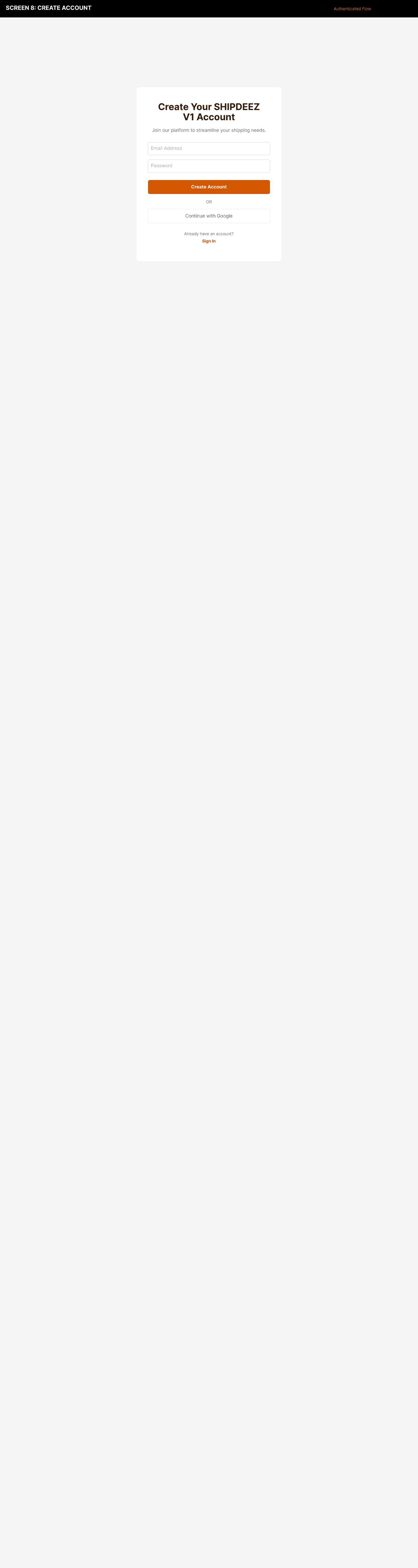
Create Account
The account creation screen had to feel low-friction while still establishing the customer relationship and wallet model. I kept the form short, surfaced the benefits of saved addresses and faster future shipments, and used simple language to explain why the account exists before asking for any payment or wallet details.
Dashboard
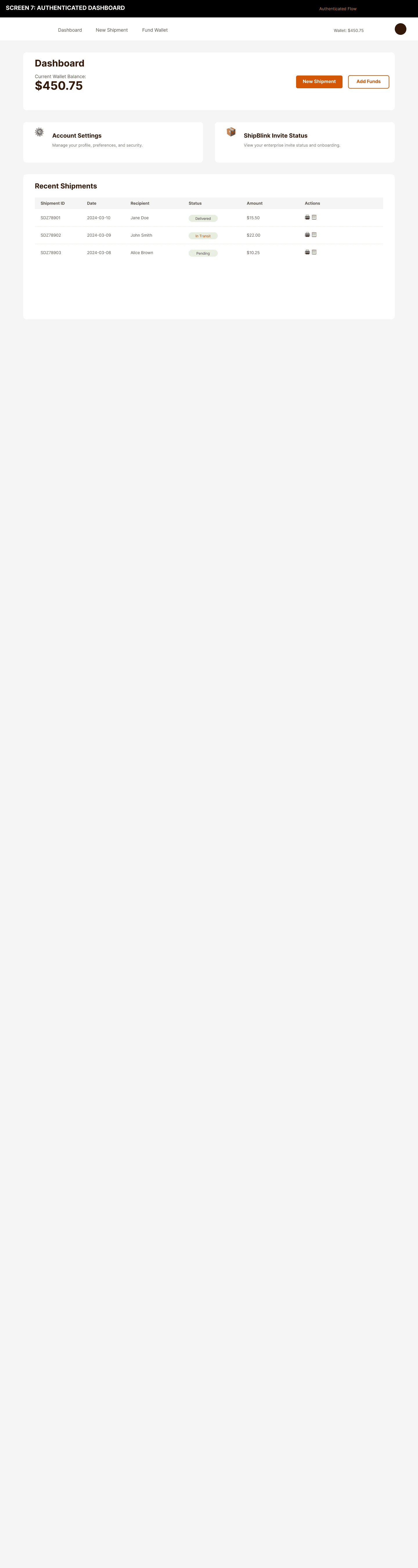
For regular shippers, the dashboard is home base. Design decisions:
- Wallet balance front and center with "New Shipment" and "Add Funds" as primary actions
- Quick access to Account Settings and ShipBlink invite status
- Recent Shipments table with status pills: Delivered, In Transit, Pending
- Navigation organized around task frequency, not system architecture
The dashboard is built for repeat work rather than discovery. By making wallet status and shipment actions immediately visible, the design supports business users who need to move quickly through the next shipment without hunting for the controls they use every day.
What Was Delivered in 10 Days
- End-to-end UX for both guest and authenticated journeys
- High-fidelity mockups for all core v1 screens
- Design system: color tokens, typography, spacing, full component library
- Live landing page built in Webflow
- Analytics instrumentation plan covering 20+ funnel events
- Platform implementation mapping for EasyPost / ShipBlink / Forge
- Wallet and failure-state UX rules document
- Developer handoff package
Key outcome: 85% average savings vs. retail shipping rates for platform users, based on negotiated carrier programs.
What I'd Do Differently
Test with real carrier data earlier. Rate comparison cards were designed with placeholder data. I couldn't validate the real UX of carrier response variation and actual rate formatting until post-handoff. That's a risk on the most important user-facing screen.
At least one usability test on the guest form. There are a lot of fields. Given more time, I'd run a session to measure completion rate and find friction before shipping.
Stepped form for mobile. The single-page form works on desktop but gets long on mobile. A stepped flow — address → package → rates — would likely improve mobile conversion. That's v2.
Reflection
ShipDeez required thinking like a product strategist and a systems designer, not just a UI designer. Every pixel had to live within a box defined by EasyPost's API capabilities, ShipBlink's white-label limits, and Forge's branding rules. Understanding those constraints before designing anything was what made the 10-day timeline survivable.
The clock also forced radical prioritization. Every decision got evaluated against one question: does this help someone get from landing page to first label? If not, it's out. That discipline is what produces a focused, shippable product instead of a spec document full of features that may never get built.
Design System
Built from scratch alongside the product. Not after — alongside.
Core colors:
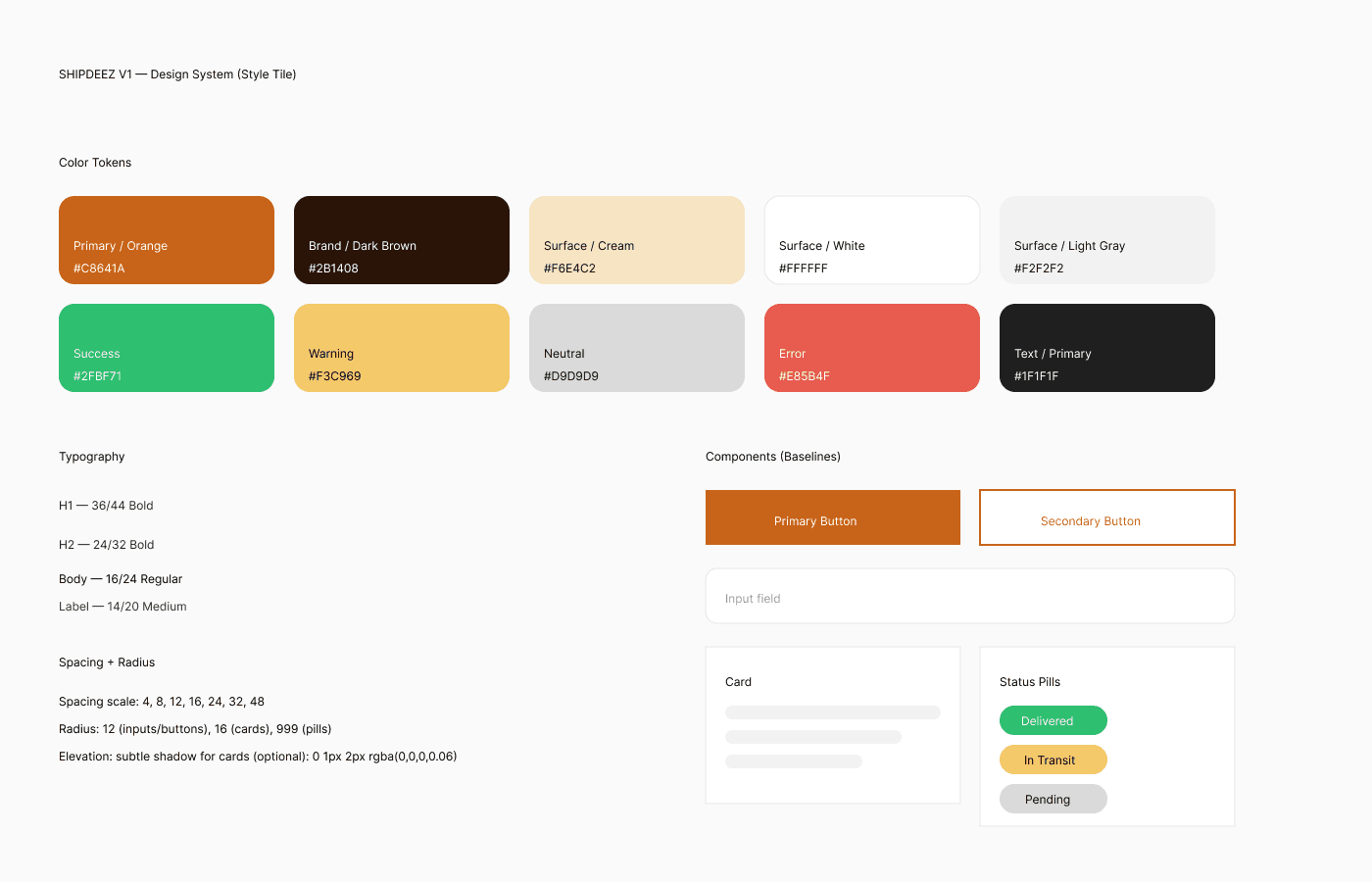
- Primary Orange (#C8641A) — CTAs, brand accent, interactive elements
- Brand Dark (#2B1408) — Hero backgrounds, navigation
- Cream (#F6E4C2) — Section backgrounds
- Surface White / Light Gray — Cards and page backgrounds
Orange was chosen as the primary brand accent because shipping tools are usually dominated by blue and gray. The warm accent creates a distinct, high-energy signal for action and makes CTAs feel more urgent and confident in a flow where users are comparing rates, paying, and tracking deliveries.
Semantic colors: Success green (#2FBF71), warning gold (#F3C969), error red (#E85B4F)
These semantic colors map directly to shipping states: green for label creation and delivered shipments, gold for low wallet balance and rate sensitivity, and red for address validation or payment failures. That state-based coloring helps users scan operational screens instantly, instead of decoding generic status labels.
Type scale: H1 36/44 Bold → H2 24/32 Bold → Body 16/24 Regular → Label 14/20 Medium
Spacing: 4px base unit — scale: 4, 8, 12, 16, 24, 32, 48
A 4px base unit was selected to support dense, data-rich interfaces like shipment tables and payment summaries while still preserving breathing room across mobile and desktop. The tight rhythm makes form fields, cards, and status pills align cleanly without feeling cramped.
One constraint worth noting: the system had to work across both ShipDeez-owned screens and ShipBlink's white-label environment. That meant prioritizing legibility, contrast, and functional spacing over decorative detail. The tokens were built to be usable by engineers in an environment where not every style could be customized.
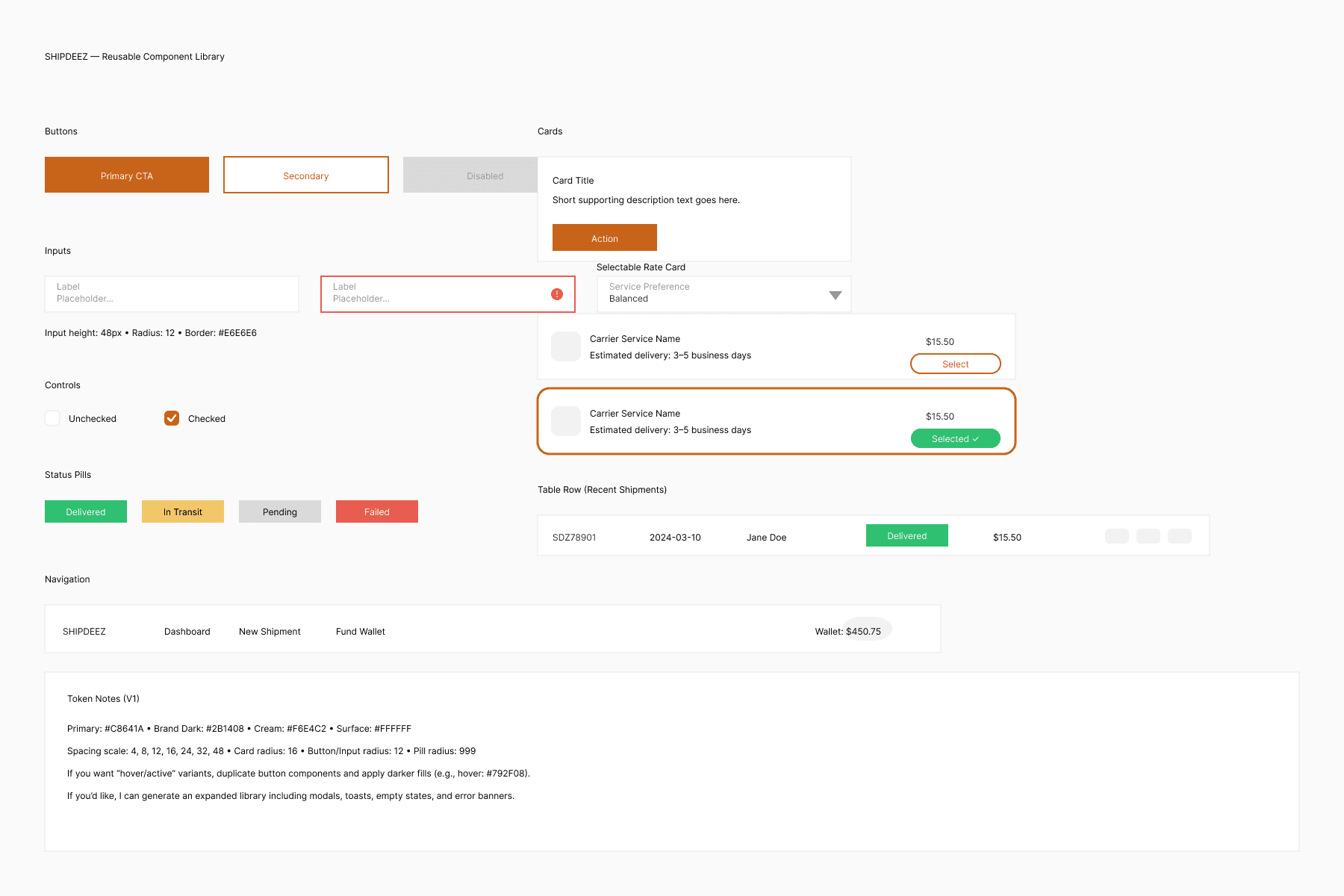
Component library: Buttons (primary, secondary, disabled), inputs with error states and validation messaging, selectable rate cards, status pills, shipment history table rows, navigation bar with wallet display, service preference dropdown.
AI in My Workflow
AI tools were part of the process from day one — not as a shortcut, but as a way to compress the time between idea and reviewable artifact.
Claude for architecture planning. I used Claude to map the platform integration — which screens live in ShipDeez-owned UI vs. ShipBlink vs. EasyPost. That mapping normally requires multiple rounds of back-and-forth with engineering. I showed up to the first stakeholder review with a draft the team could validate, not start from scratch.
GPT for edge case analysis. What happens when the wallet has insufficient funds? When address verification fails? When the user abandons mid-payment? GPT helped me stress-test flows for failure states before I'd designed the failure states themselves.
Claude for design system documentation. Initial token specs and component documentation were drafted with Claude, then refined for the actual developer handoff package.
Copy and microcopy. Landing page headlines, CTAs, error messages, empty states — all drafted with AI, refined for voice and brand tone.
Analytics taxonomy. The full funnel event tracking plan (20+ events from landing to label download) was architected with Claude to make sure there were no gaps.
Notes from brain dump: I used Claude to map platform integration responsibilities (ShipDeez vs ShipBlink vs EasyPost) and GPT to stress-test failure states (insufficient wallet funds, address verification failures, payment abandonment), which helped tighten UX before handoff.
What I didn't use AI for: the actual design judgment. Deciding what the product should be, what to cut, what users actually need — that's still the work.
Analytics Foundation
I delivered a complete instrumentation plan for the full funnel before handoff — not as an afterthought.
Funnel events: Landing page view → business/consumer selection → Ship Now CTA → signup start → signup complete → rate quote retrieved → label created → label purchased → label downloaded → tracking viewed
Nurture and brand events: Email opt-in, swag store clicks, storefront conversion, return visits
Implementation: Google Analytics 4 with custom event taxonomy, Microsoft Clarity for session recordings and heatmaps
The goal: drop-off visibility from day one, not bolted on later after the team realizes they can't answer basic funnel questions.